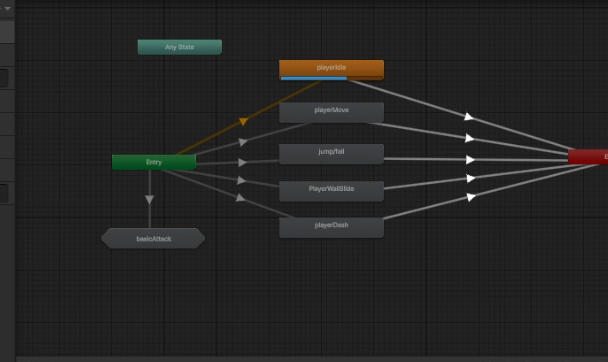
복잡한 상태를 하위 계층 구조로 나누어 관리할 수 있는 sub state machine을 사용하여 콤보 공격을 구현하였다.
콤보 공격에 사용된 sub state machine의 내부 구조는 다음과 같다.
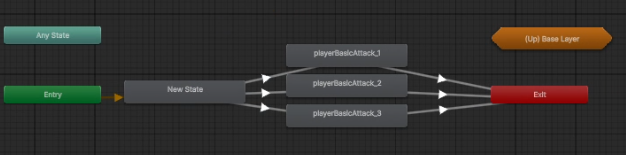
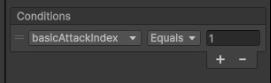
이런식으로 인덱스가 같으면 다음 인덱스로 넘어가게끔 한 것이다.
아래는 콤보 구현 방식 코드이다.
using UnityEngine;

public class Player_BasicAttackState : EntityState
{

    private float attackVelocityTimer;

    private const int FirstComboIndex = 1;
    private int comboIndex = 1;
    private int comboLimit = 3;
    public Player_BasicAttackState(Player player, StateMachine stateMachine, string animBoolName) : base(player, stateMachine, animBoolName)
    {

    }

    public override void Enter()
    {
        base.Enter();

        ResetComboIndexIfNeeded();

        anim.SetInteger("basicAttackIndex", comboIndex);
        ApplyAttackVelocity();
    }

    public override void Update()
    {
        base.Update();
        HandleAttackVelocity();

       if (triggerCalled)
        {
            stateMachine.ChangeState(player.idleState);
        }
    }

    public override void Exit()
    {
        base.Exit();
        comboIndex++;
    }

    private void ApplyAttackVelocity()
    {
        attackVelocityTimer = player.attackVelocityDuration;
        player.SetVelocity(player.attackVelocity.x * player.facingDir, player.attackVelocity.y);
    }

    private void HandleAttackVelocity()
    {
        attackVelocityTimer -= Time.deltaTime;

        if (attackVelocityTimer < 0)
        {
            player.SetVelocity(0, rb.linearVelocity.y);
        }
    }

    private void ResetComboIndexIfNeeded()
    {
        if (comboIndex > comboLimit)
            comboIndex = FirstComboIndex;
    }
}
콤보 구현에 만약 시간차를 구해서 특정 시간을 넘으면 콤보가 연결되지 않도록 하는 것은 마지막 부분을 다음과 같이 고치면 된다.
    private void ResetComboIndexIfNeeded()
    {
        if (Time.time > lastTimeAttacked + player.comboResetTime)
        {
            comboIndex = FirstComboIndex;
        }
        if (comboIndex > comboLimit)
        {
            comboIndex = FirstComboIndex;
        }
    }
콤보 공격 중 방향 변환하기
공격 state로 전환되어 Enter에서
공격 중에 (콤보 어택 플레이 중에) 만약 moveInput이 들어왔다면,
이전에 facingDir을 기준으로 하지 않는다.
moveInput에 대한 Dir을 기준으로 삼은 뒤
해당 방향을 공격 방향으로 정의한다.
이후 플레이어의 velocity를 attackDir에 맞게 적용시킨다.
    public override void Enter()
    {
        base.Enter();
        comboAttackQueued = false;
        ResetComboIndexIfNeeded();

        attackDir = player.moveInput.x != 0 ? ((int)player.moveInput.x) : player.facingDir;


        anim.SetInteger("basicAttackIndex", comboIndex);
        ApplyAttackVelocity();
    }


...
...


	private void ApplyAttackVelocity()
    {
        Vector2 attackVelocity = player.attackVelocity[comboIndex - FirstComboIndex];

        attackVelocityTimer = player.attackVelocityDuration;
        player.SetVelocity(attackVelocity.x * attackDir, attackVelocity.y);
    }
'Unity' 카테고리의 다른 글
| Canvas를 Dynamic과 static으로 분리 (0) | 2025.05.18 |
|---|---|
| UnityWebRequest (2) | 2025.05.12 |
| Unity MonoBehaviour, 코루틴 자주 쓰이는 기본 함수 문서 정리 1 (0) | 2025.04.05 |
| Unity - BroadCasting, SendMessage, BroadcastMessage (0) | 2025.03.16 |
| 유니티 적군 상태 변환 (0) | 2024.08.09 |