https://github.com/kwon1232/RPG_2D
GitHub - kwon1232/RPG_2D: RPG_2D
RPG_2D. Contribute to kwon1232/RPG_2D development by creating an account on GitHub.
github.com
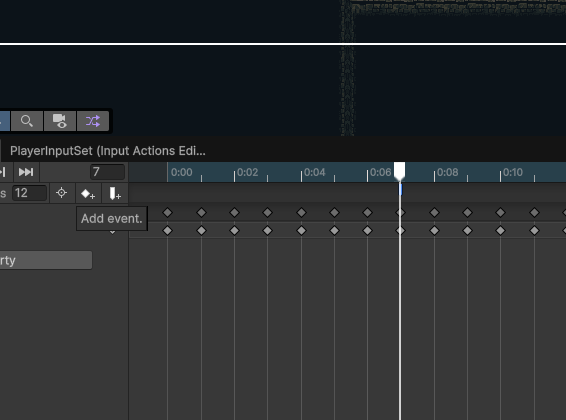
일단 Attack 애니메이션의 어느 부분에 타겟을 인지할 지 정해야 한다.
이는 이벤트 트리거 스크립트를 이용하여 AttackTrigger() 함수를 바인딩해준다.
public class Entity_AnimationTriggers : MonoBehaviour
{
    private Entity entity;
    private Entity_Combat entityCombat;

    private void Awake()
    {
        entity = GetComponentInParent<Entity>();
        entityCombat = GetComponentInParent<Entity_Combat>();
    }

    private void CurrentStateTrigger()
    {
        entity.CurrentStateAnimationTrigger();
    }

    private void AttackTrigger()
    {
        entityCombat.PerformAttack();
    }
}
EntityCombat의 내부는 다음과 같은 코드로 구성되어 있다.
public class Entity_Combat : MonoBehaviour
{

    [Header("Target detection")]
    [SerializeField] private Transform targetCheck;
    [SerializeField] private float targetCheckRadius;
    [SerializeField] private LayerMask whatIsTarget;

    public void PerformAttack()
    {
        foreach ( var target in GetDetectedColliders())
        {
            //데미지 관련 코드...
        }
    }

    private Collider2D[] GetDetectedColliders()
    {
         return Physics2D.OverlapCircleAll(targetCheck.position, targetCheckRadius, whatIsTarget);
    }

    private void OnDrawGizmos()
    {
        Gizmos.DrawWireSphere(targetCheck.position, targetCheckRadius);
    }
마지막으로 타격 시 머티리얼 변경하는 건 다음과 같이 할 수 있다.
우선 2d환경이니 그에 맞추어 Text Shader로 변경해준다.
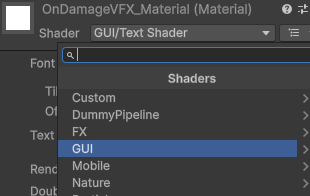
이후 머티리얼을 스왑해주는 코드를 작성하여
해당 컴포넌트를 Heath가 소유하도록 하고, 같은 경로에 컴포넌트를 부여해준다.
public class Entity_VFX : MonoBehaviour
{
    private SpriteRenderer sr;

    [Header("On Damage VFX")]
    [SerializeField] private Material onDamageMaterial;
    [SerializeField] private float onDamageVfxDuration = 0.2f;
    private Material originalMaterial;
    private Coroutine onDamageVfxCoroutine;

    private void Awake()
    {
        sr = GetComponentInChildren<SpriteRenderer>(true);
        originalMaterial = sr.material;
    }

    public void PlayOnDamageVfx()
    {
        if (onDamageVfxCoroutine != null)
            StopCoroutine(onDamageVfxCoroutine);

        onDamageVfxCoroutine = StartCoroutine(OnDamageVfxCo());
    }

    private IEnumerator OnDamageVfxCo()
    {
        sr.material = onDamageMaterial;

        yield return new WaitForSeconds(onDamageVfxDuration);
        sr.material = originalMaterial;
    }
    //.... 기타 코드

}'DevLog > 유니티 프로젝트' 카테고리의 다른 글
| 2D RPG - 플레이어를 인식하는 enemy AI (0) | 2026.01.13 |
|---|---|
| 몬스터 ai의 ground checking (0) | 2026.01.13 |
| 유니티 구글 스프레드 시트 연동 툴 (4) | 2025.06.29 |
| DT 기능 에디터 만들기 GoogleSheetURLParser Class 설명 (2) | 2025.06.08 |
| 구글 엑셀 연동 DT 관리 - GoogleDTTemplate 클래스 정리 (1) | 2025.05.27 |